

Download Image Zoom – image zoom, zoom in on image, image magnifier, enlarge image, view image details
Overview
The mobile application Image Zoom is designed to address a common frustration faced by smartphone users: the inability to clearly view small or low-resolution images directly from web pages. Many users encounter thumbnail previews or compressed images while browsing online, often needing to open them in a new tab or download them to see finer details. Image Zoom eliminates this inconvenience by allowing users to magnify any image on a webpage directly within their browser, without leaving the current page or downloading the file.
Targeted at individuals who frequently browse websites, social media, or online marketplaces, this app is particularly useful for those who need to inspect product images, architectural details, or small text in visual content. The app’s core purpose is to enhance visual clarity and improve user experience during online exploration. It supports quick, on-the-go inspection of images without the need for additional steps or third-party tools.
Developed by Image Zoom, the app is positioned as a lightweight utility focused on productivity and efficiency. Although the developer did not provide additional technical details, the app’s minimal size of 1.5 MB suggests a streamlined design. Its release on July 12, 2024, marks a recent addition to the Android productivity ecosystem, catering to users seeking instant image magnification tools.
Key Features & Functionality
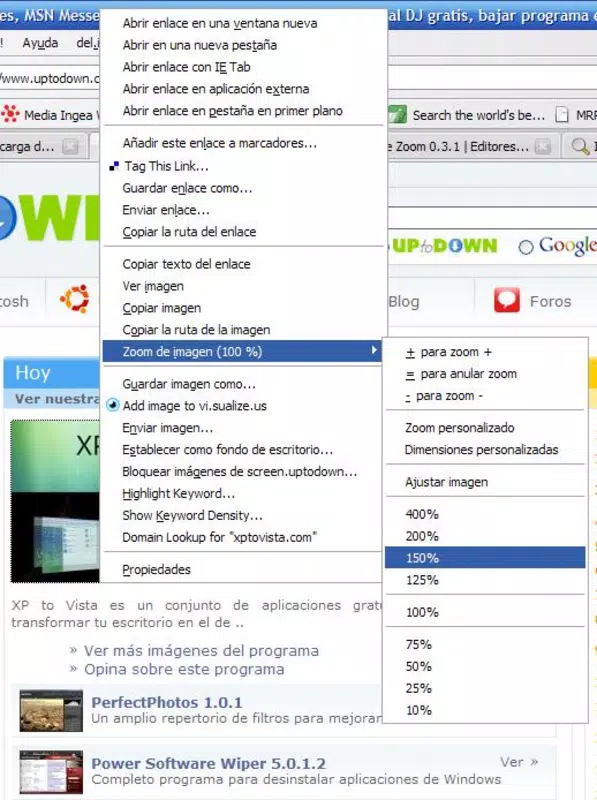
- On-the-fly image zooming – Users can magnify any image on a webpage instantly by selecting a zoom percentage from a context menu.
- Non-intrusive interface – The app operates without requiring image downloads or tab redirection, preserving browsing flow.
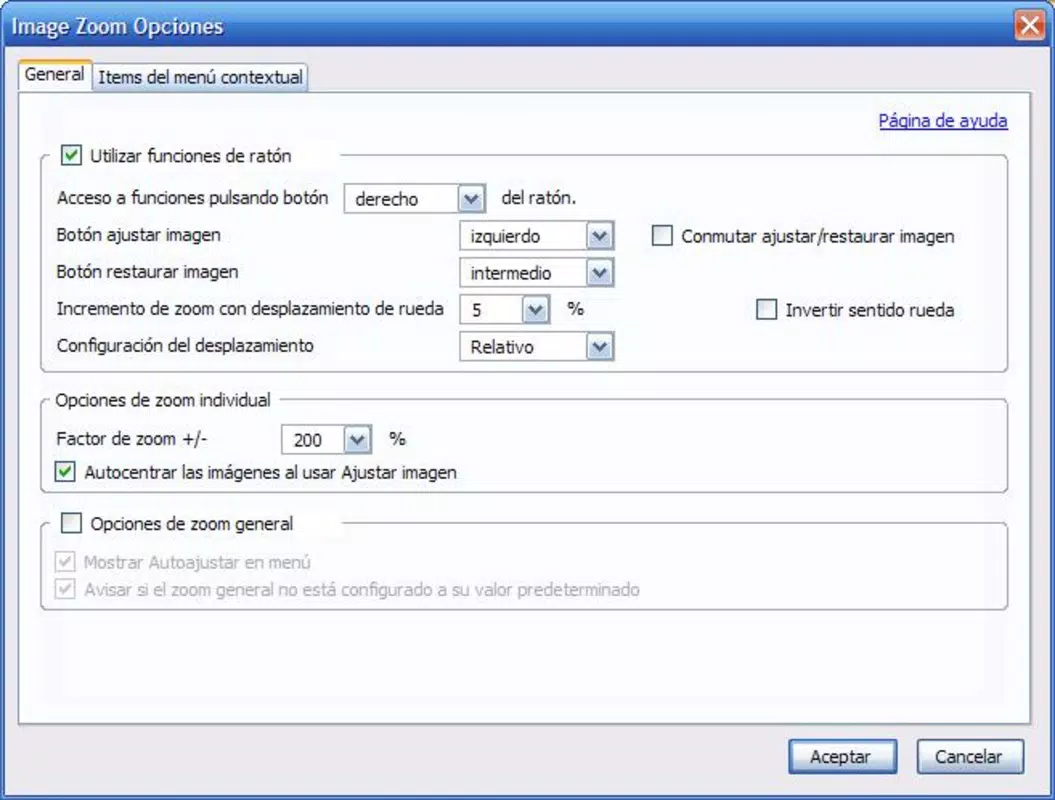
- Customizable zoom levels – Users can set a default zoom percentage to suit their visual preferences.
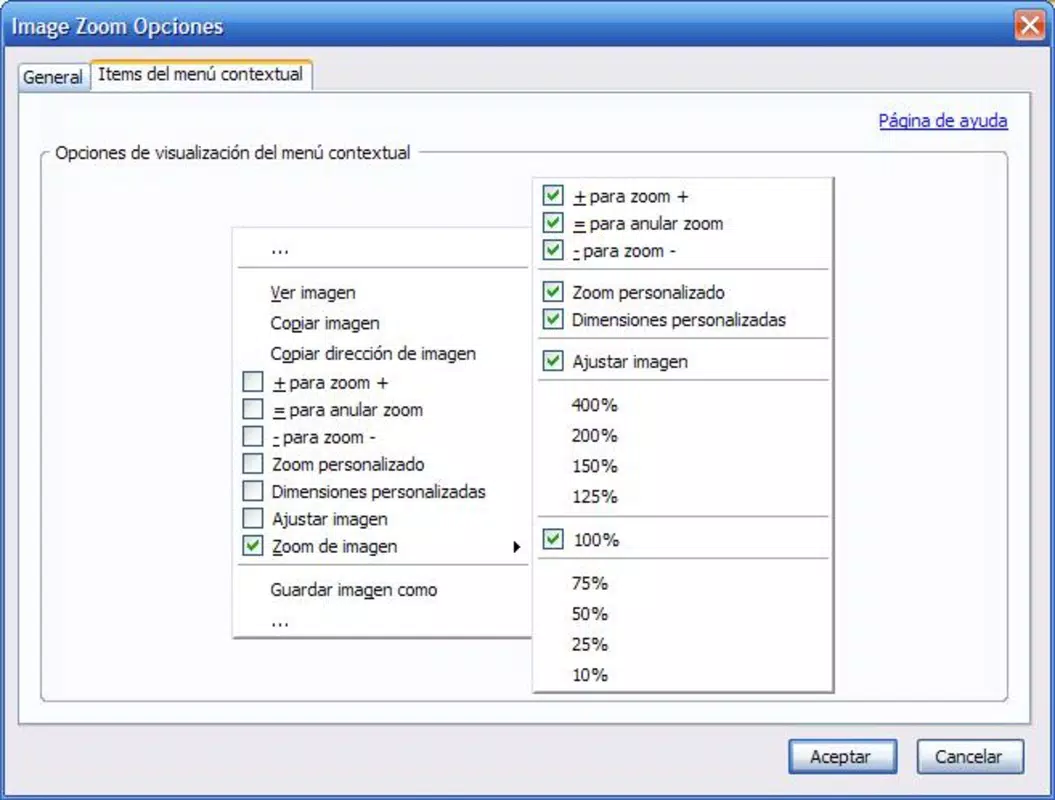
- Personalized shortcut menu – The action button and displayed options can be adjusted based on user needs.
- Lightweight performance – With a file size of just 1.5 MB, the app consumes minimal storage and system resources.
For example, a user browsing an e-commerce site can quickly zoom in on a product’s fabric texture or stitching detail without navigating away. Similarly, someone reviewing a technical diagram or a map can inspect fine lines or labels without difficulty. The ability to adjust the zoom level on demand enhances accessibility and reduces visual strain. The customization options ensure that the app adapts to different user habits, making it efficient for both casual and frequent use. This level of control contributes to a more intuitive and user-centric experience.
Interface, UX & Performance
The user interface of Image Zoom is designed with simplicity and efficiency in mind. The app integrates seamlessly into the browser environment, offering a clean and unobtrusive experience. Users access its functionality through a context menu, typically activated via a long press or right-click on an image, depending on device support.
Navigating through the app is straightforward, with minimal steps required to initiate a zoom action. The visual style prioritizes clarity over decoration, ensuring that the focus remains on the image being magnified. Although the developer did not list formal performance metrics, the app’s small file size suggests optimized code and efficient memory usage.
Performance across different device categories is expected to be consistent, given the lightweight nature of the application. Responsiveness is likely to be strong, as the app does not rely on heavy processing or external dependencies. Stability is also anticipated, especially since the app operates within a constrained scope—focusing solely on image magnification. However, specific compatibility with older Android versions or low-end devices was not disclosed.
Platform Compatibility & Technical Requirements
Image Zoom is available exclusively on the Android platform. It is compatible with Android devices that meet the standard requirements for running lightweight applications. The app has a file size of 1.5 MB, making it suitable for devices with limited storage capacity.
Although the developer did not specify minimum OS requirements, the app’s release date of July 12, 2024, indicates it was designed for recent Android versions. The software version is 1.0, suggesting an initial stable release. Users should ensure their device supports the latest browser extensions or in-app integration features, though exact compatibility details were not provided.
Pros and Cons
Pros
- Effortless image magnification without leaving the current webpage
- Free to download and use, with no in-app purchases
- Minimal storage footprint (1.5 MB) ideal for low-end devices
- Customizable zoom levels and interface options
- Simple, intuitive interface suitable for all user levels
Cons
- Platform limited to Android; no iOS availability mentioned
- Specific system requirements were not disclosed
- Functionality restricted to browser-based images only
- No offline mode or image caching support
- Developer did not provide detailed update history or roadmap
FAQ
Is Image Zoom safe to install on my Android device?
Yes, the app is free and available through official Android channels. Its small size and limited functionality reduce potential security risks. As with any app, users should download it from trusted sources.
Can I use Image Zoom on iOS devices?
The developer did not indicate iOS compatibility. The app is currently available only on Android.
Does Image Zoom require internet access?
Yes, since the app magnifies images from web pages, an active internet connection is required to load and display the content.
How do I update Image Zoom?
Updates are typically delivered through the Google Play Store. Users should ensure their app store is set to auto-update or check manually for new versions.
Can I zoom in on images saved in my gallery?
No, the app is designed to work only with images viewed on web pages. It does not support images stored locally on the device.
Final Thoughts
Image Zoom delivers a focused, efficient solution for users who frequently need to inspect small or unclear images while browsing online. Its minimalist design, zero cost, and lightweight performance make it a practical addition to any Android user’s toolkit. While it serves a narrow but valuable purpose, it excels in its core function: providing instant image magnification without friction.
Those who spend significant time on e-commerce sites, social media, or technical documentation will benefit most from this utility. It enhances visual clarity and supports better decision-making, whether evaluating a product or reading fine print in a diagram. The app’s simplicity and lack of distractions reinforce its value as a productivity booster.
Despite its limited scope and platform exclusivity, Image Zoom proves that a small app can deliver meaningful functionality. For users seeking a no-fuss way to zoom in on web images, this tool offers real convenience.
Download Image Zoom now


